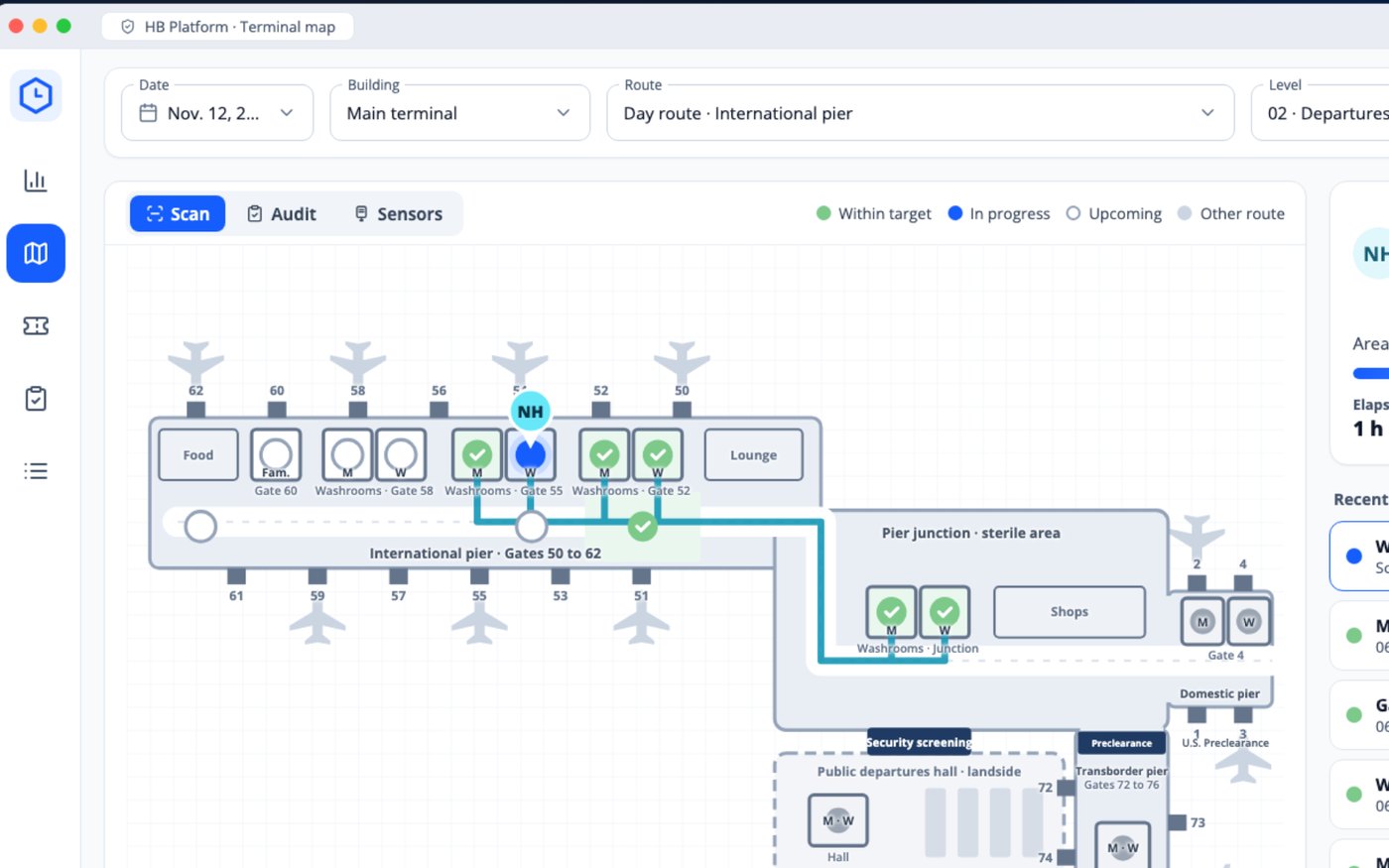
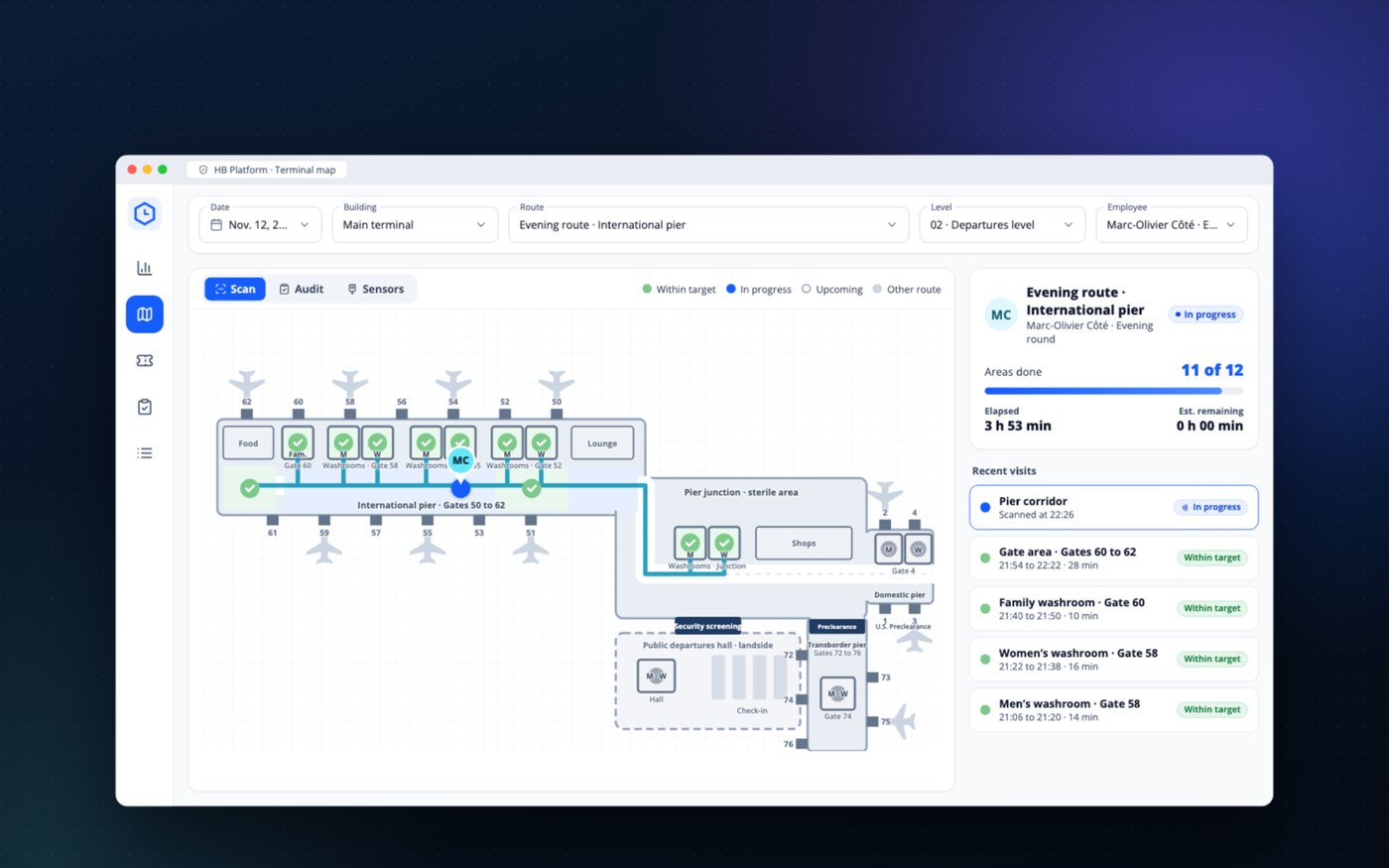
Each scanned block appears on the map
The supervisor watches the route progress, pier by pier, without calling anyone on the radio.
Terminal washrooms fill up with every arrival, and an empty dispenser gets noticed before anything else. With the HB platform, you see what was done in each area, from the washrooms to the gate areas, where and at what time, and every alert goes to the right person. Foot-traffic counts and Tork dispenser levels appear in the same view as the team’s visits. The video follows a typical day, from the first flight to the last.
What the video shows
The supervisor watches the route progress, pier by pier, without calling anyone on the radio.
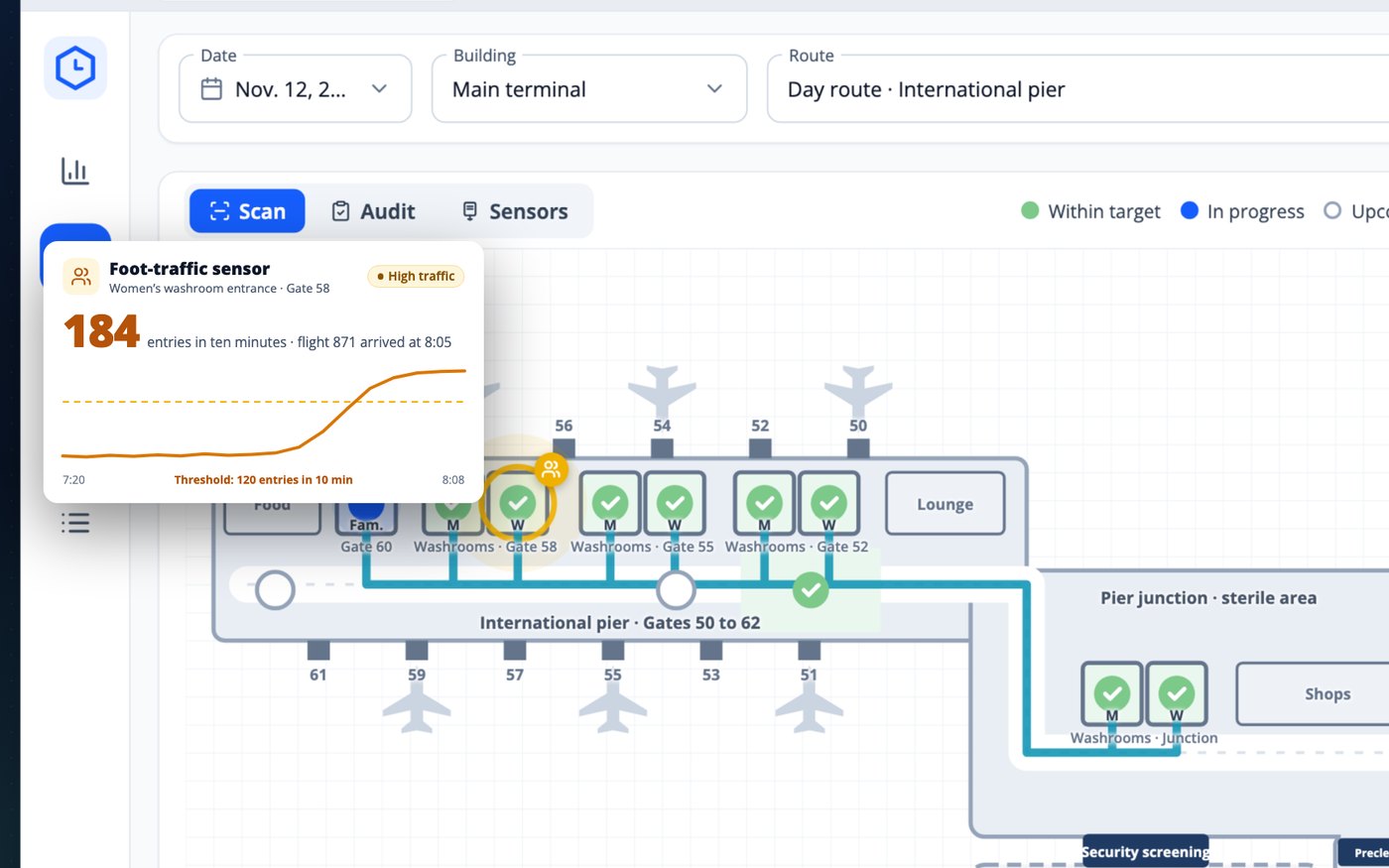
A sensor counts entries at the washroom door. After a flight, the platform asks the nearest attendant for a visit.
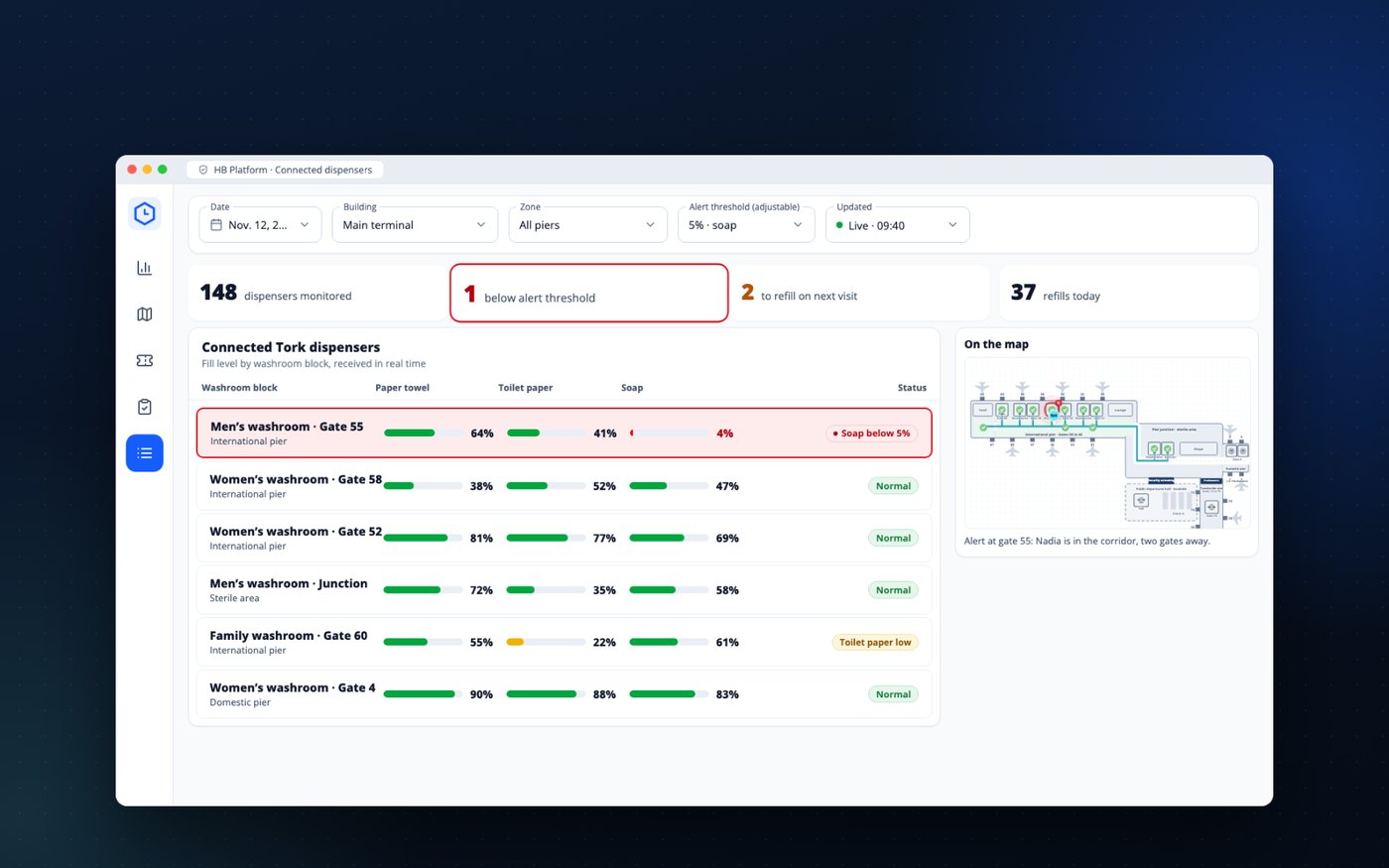
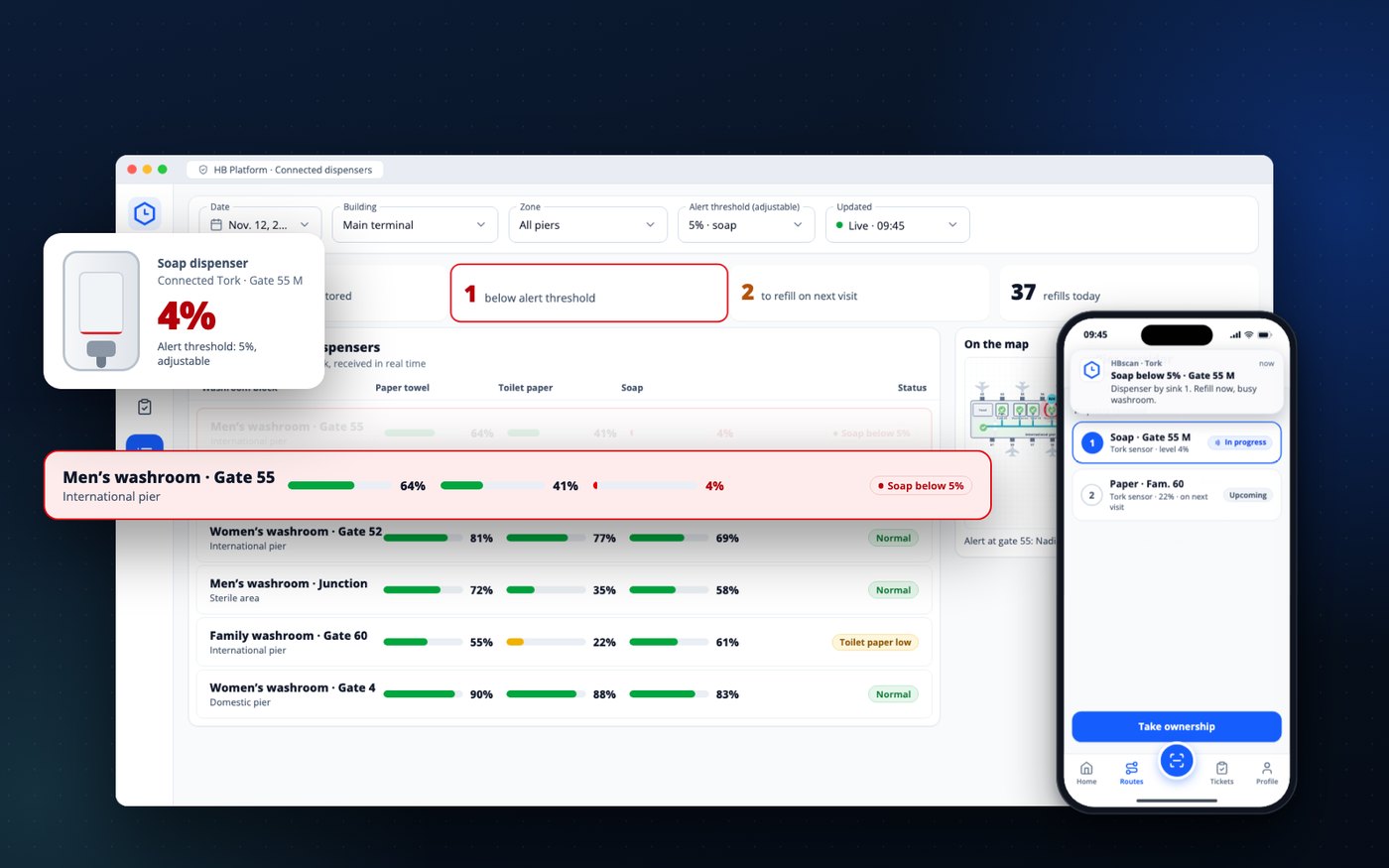
Connected Tork dispensers send their level continuously. Below the threshold, the alert appears on the map and on the phone.
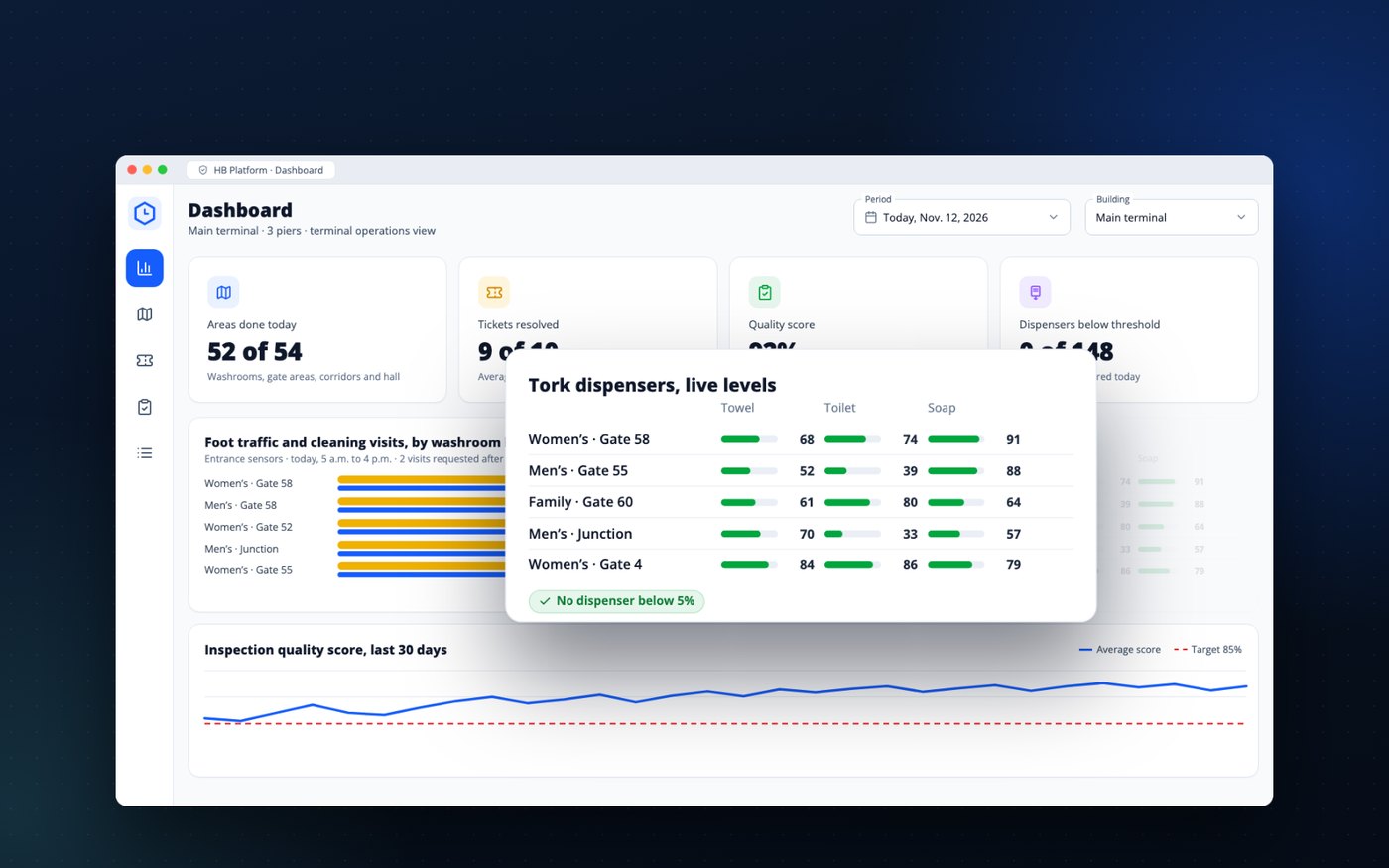
Blocks done, tickets resolved, inspections, foot traffic and dispenser levels, in a single portal.
Who we are
The HB platform is developed and supported in Montreal by ValkarTech. Cleaning companies and building managers use it every day, in office buildings, health care facilities and institutions, to track their routes, their requests and their inspections. An airport terminal adds flight waves and sensors; our clients already do the rest.
For a terminal, we connect the two measurements that matter most in your washrooms: foot traffic counted at the door and dispenser levels. A sensor alert does not sit in a separate piece of software: it becomes an assigned visit, logged on the map and counted in your report.


HB Platform · HBpunch, HBscan, HBconnect, HBticket, HBcontrol
For the contractor and for the airport
For attendants, there is one extra step: tapping the tag at the door of each area. Everything else, they already do. What changes is what the contractor and the airport get out of it.
The day, step by step
Rivière-aux-Vents airport, its flights and the people in this day are fictional. The screens were redrawn for the video from the HB platform; in a demo, you will see the platform itself, with your floor plan.
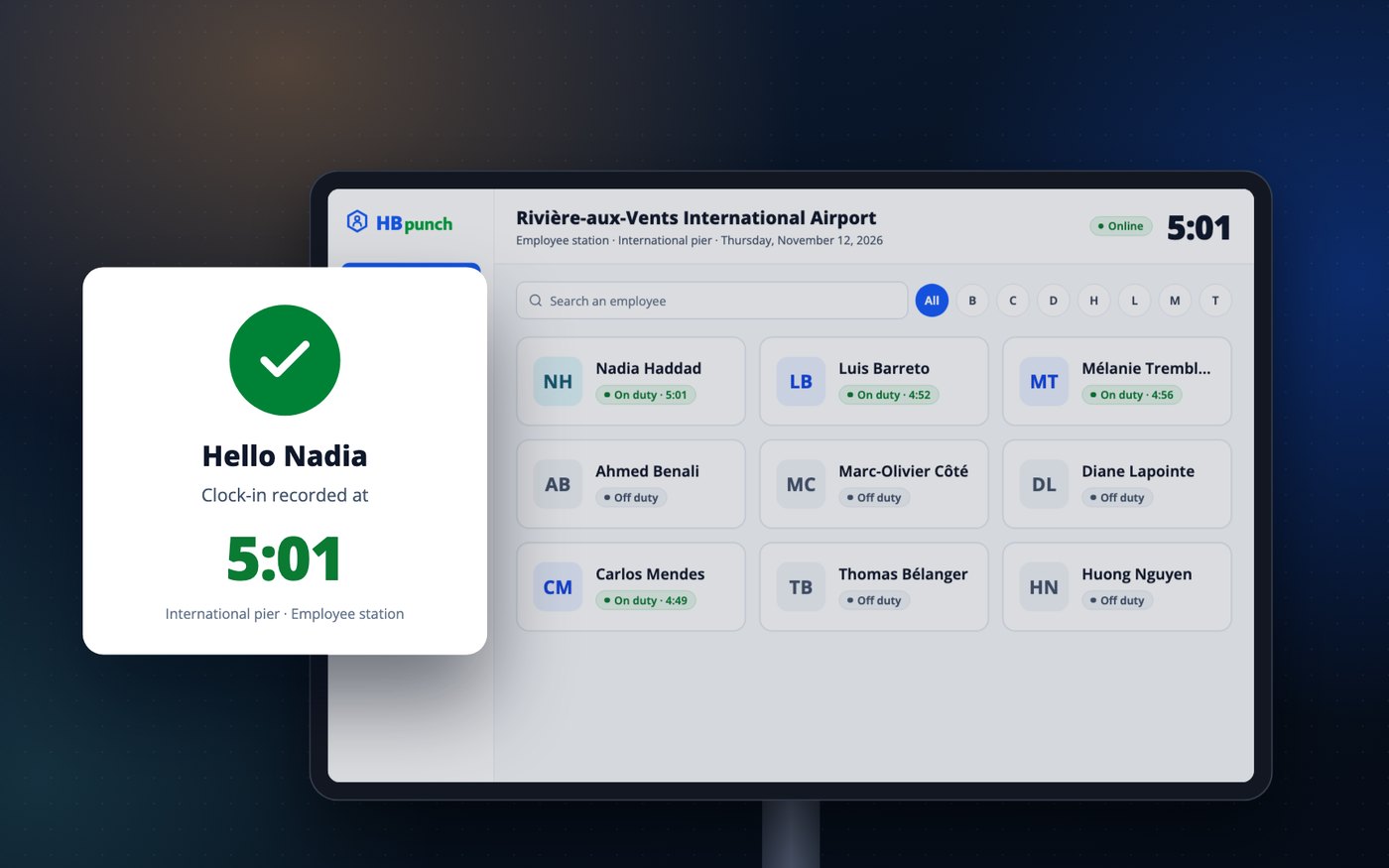
At the pier’s staff station, Nadia taps her name on the tablet and enters her PIN. Her supervisor knows she is on duty before the first wave of departures.
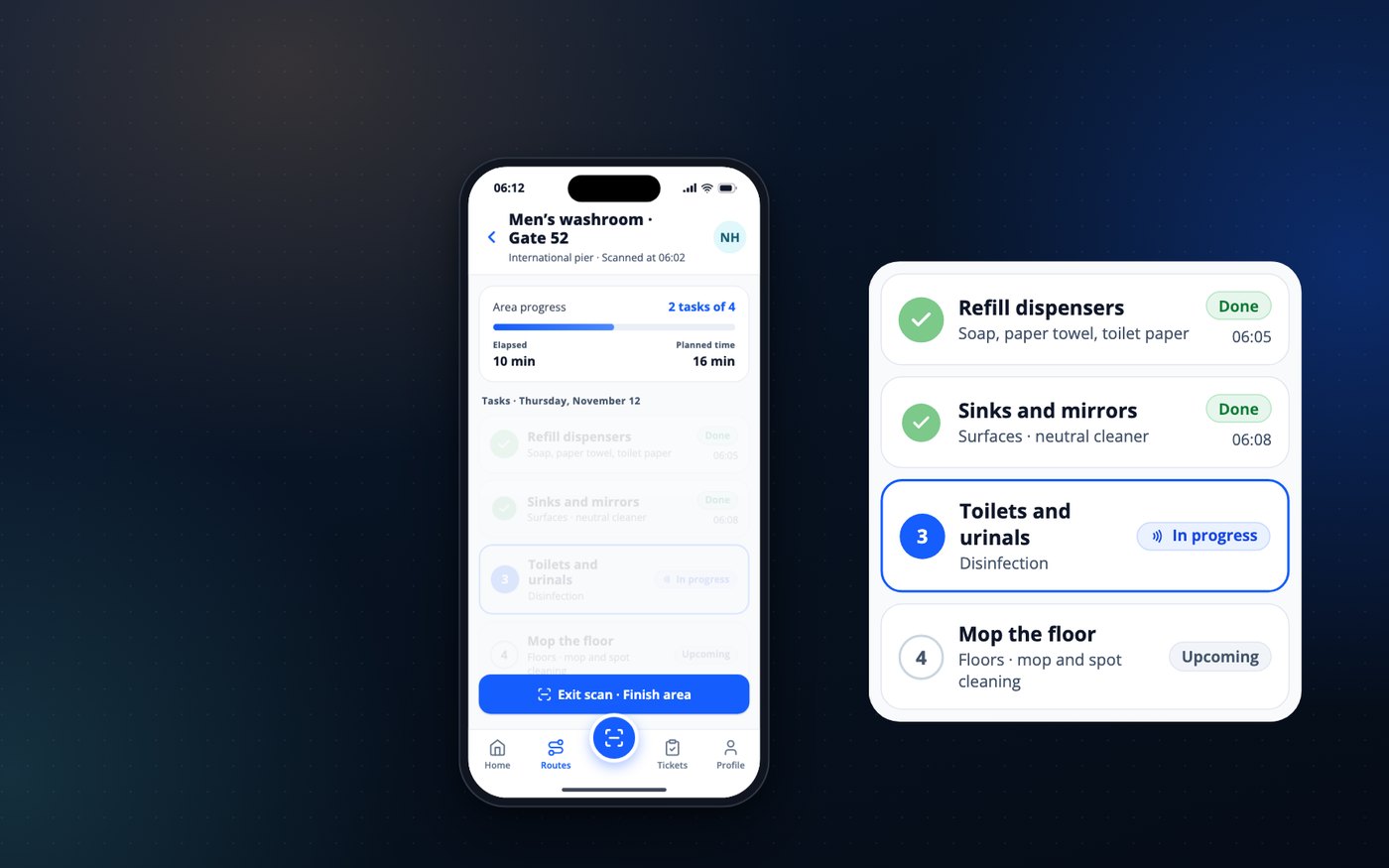
She holds her phone to the tag placed at the entrance of the block. The four tasks appear, from dispensers to toilets, and get checked off as the work goes. Time spent is compared with the planned time for this area. Every area on the route has its tag, gate areas, corridors and the departures hall as well as washrooms, and the round repeats during the shift: the busiest areas are revisited at short intervals, as set in your agreement.
From the cleaning office, Samuel watches Nadia’s route progress on the pier map. Each area turns green when it is done, washrooms and gate areas alike, with the time and the time spent. He knows where she is without reaching her on the radio. The day route is a loop: each block is revisited several times per shift, more often at gates where a flight has just arrived.
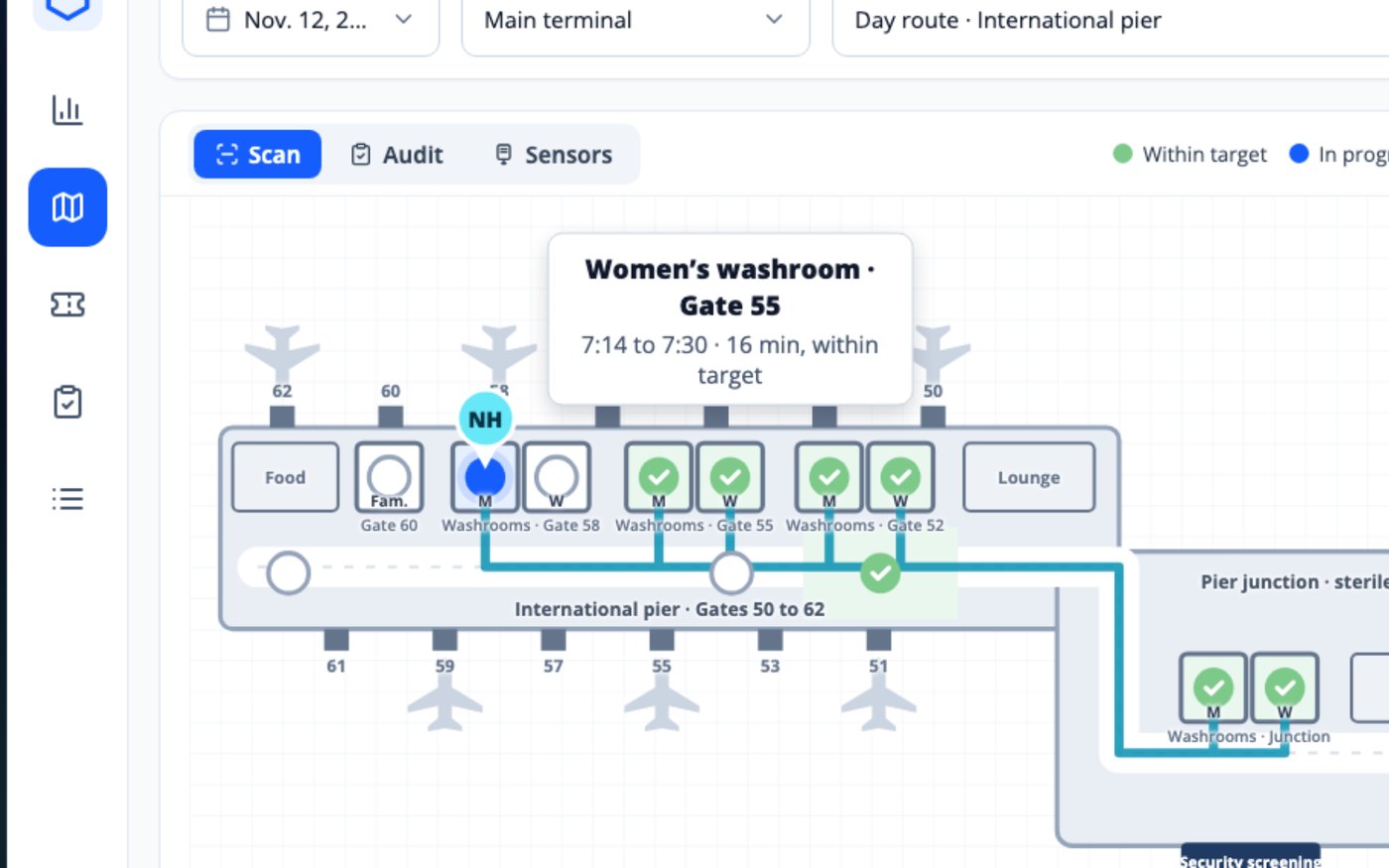
The overnight flight from Vancouver has just arrived at gate 58, a gate where the terminal schedules domestic flights in the morning. The sensor at the washroom entrance counts 184 entries in ten minutes, well above the threshold. The platform flags high traffic and asks Nadia, who is one gate away, for a visit. Cleaning follows the flights, not just the schedule.
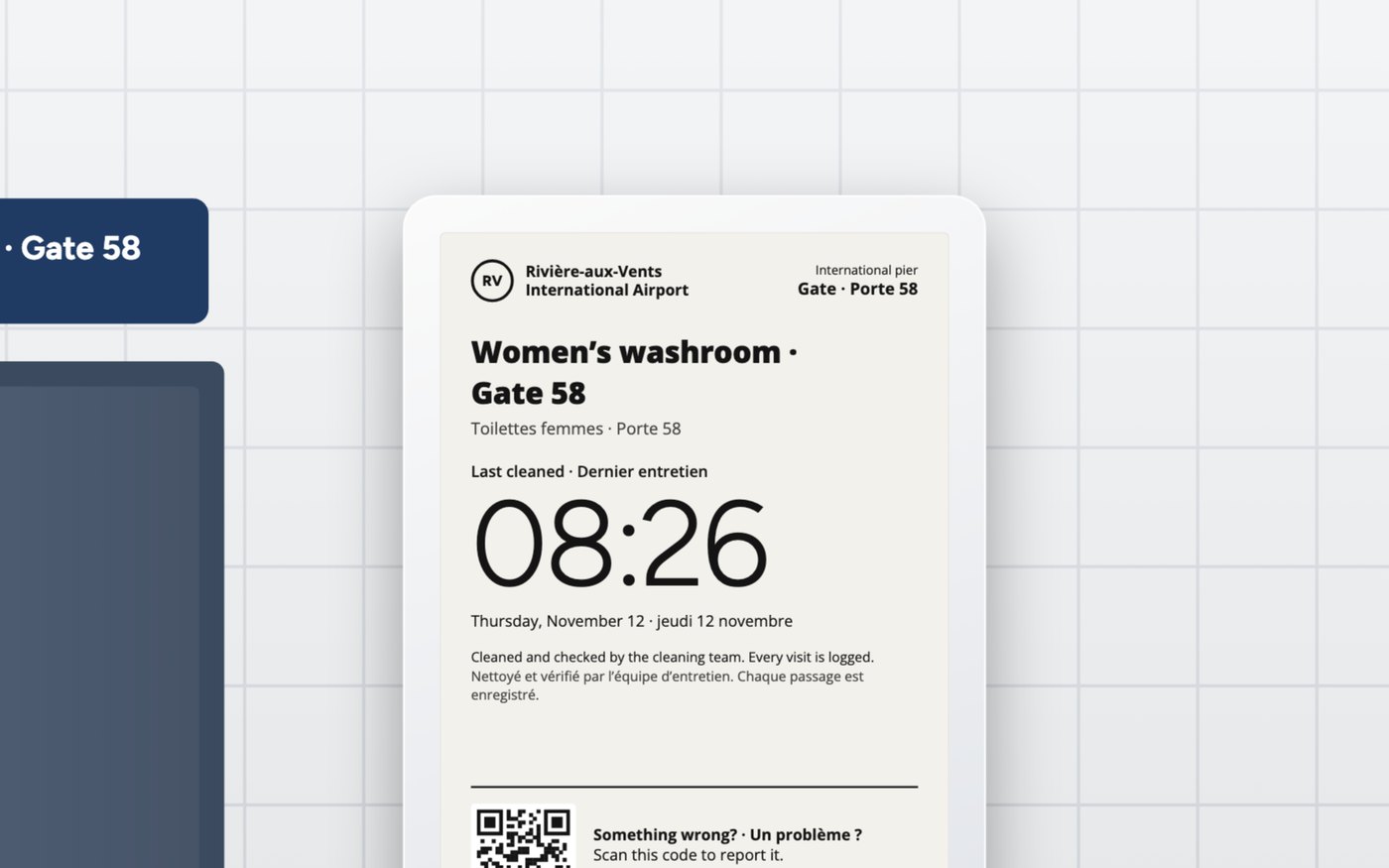
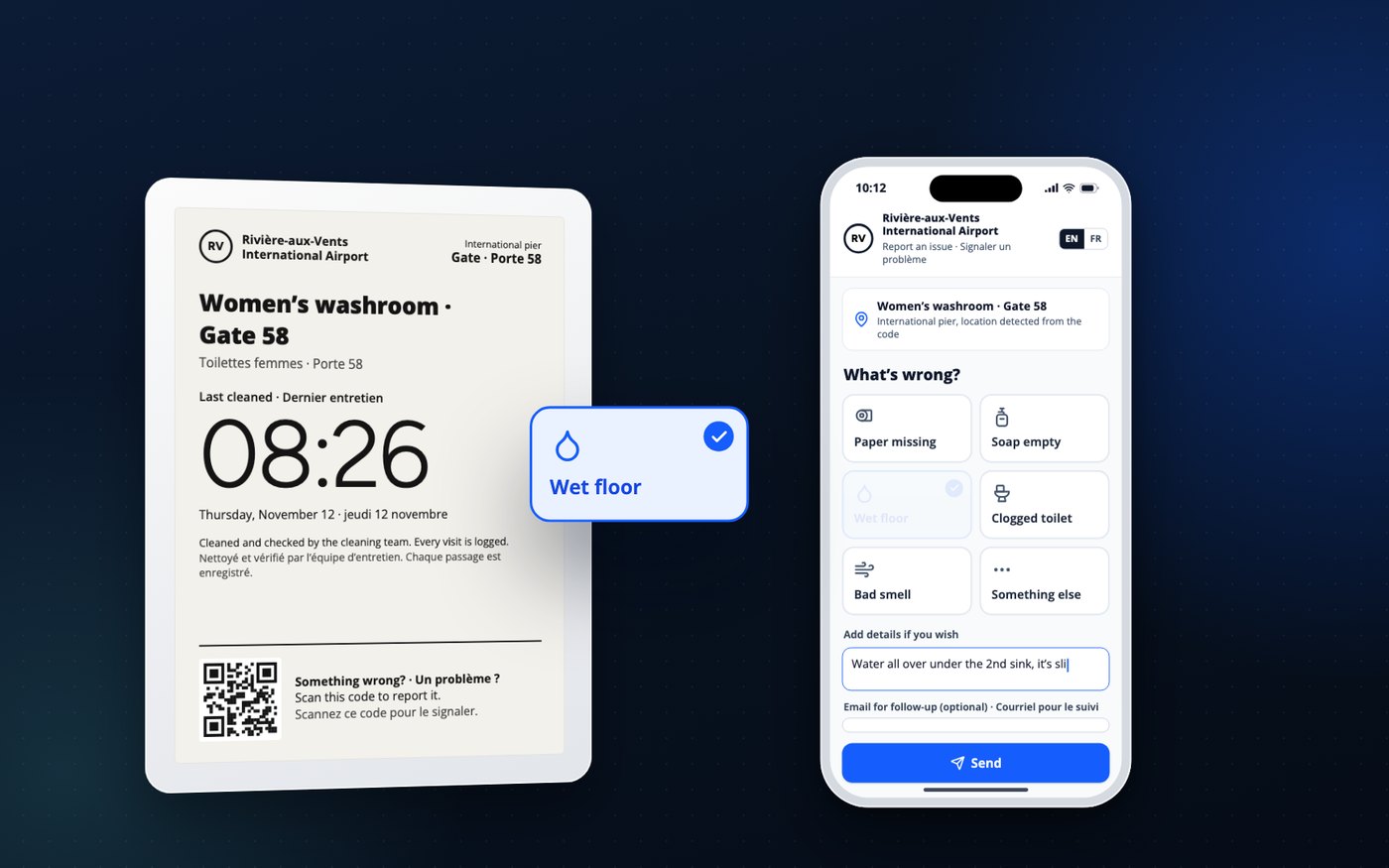
As she leaves the washroom, her phone updates the screen at the entrance over Bluetooth, in English and French. The last-cleaned time shown is therefore the time of her visit. The screen runs on batteries, with no wiring or network at the wall.
The soap and paper dispensers are connected Tork units. Their level reaches the platform continuously. At gate 55, the soap drops below the threshold the airport chose, 5% in the video: the alert appears on the map and on Nadia’s phone, and she refills the dispenser before a traveller finds it empty. Twelve minutes later, the level is at 100%.
She notices water near the sinks. She scans the code on the screen, chooses “Wet floor” and adds a note. She leaves her email only if she wants a follow-up: nothing else is asked of her. The location is already known from the code, and she has nothing to install.
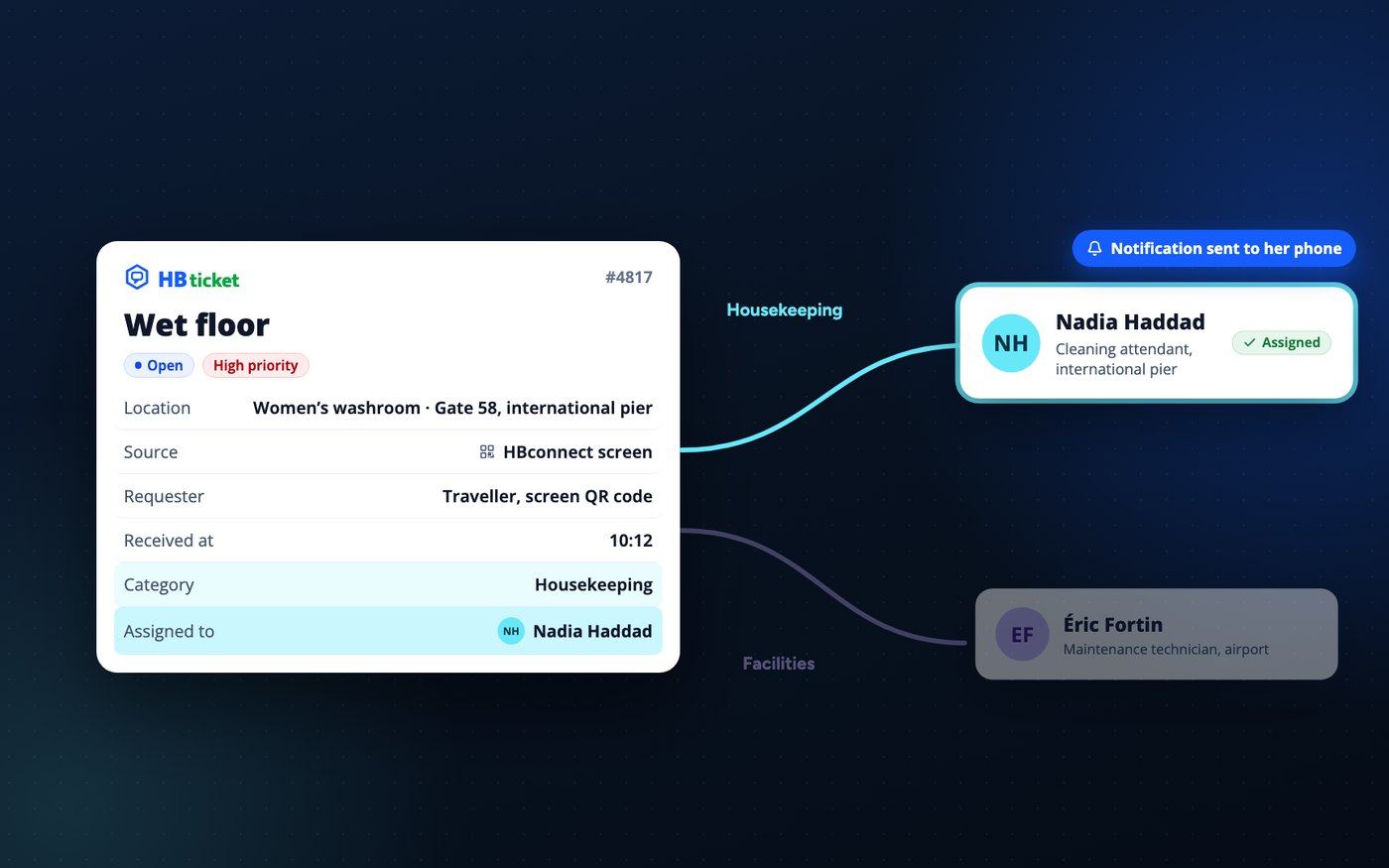
The report becomes a ticket in the “Housekeeping” category. It is assigned to the pier’s attendant and a notification goes to her phone. A building-related request would have gone to the airport’s technician.
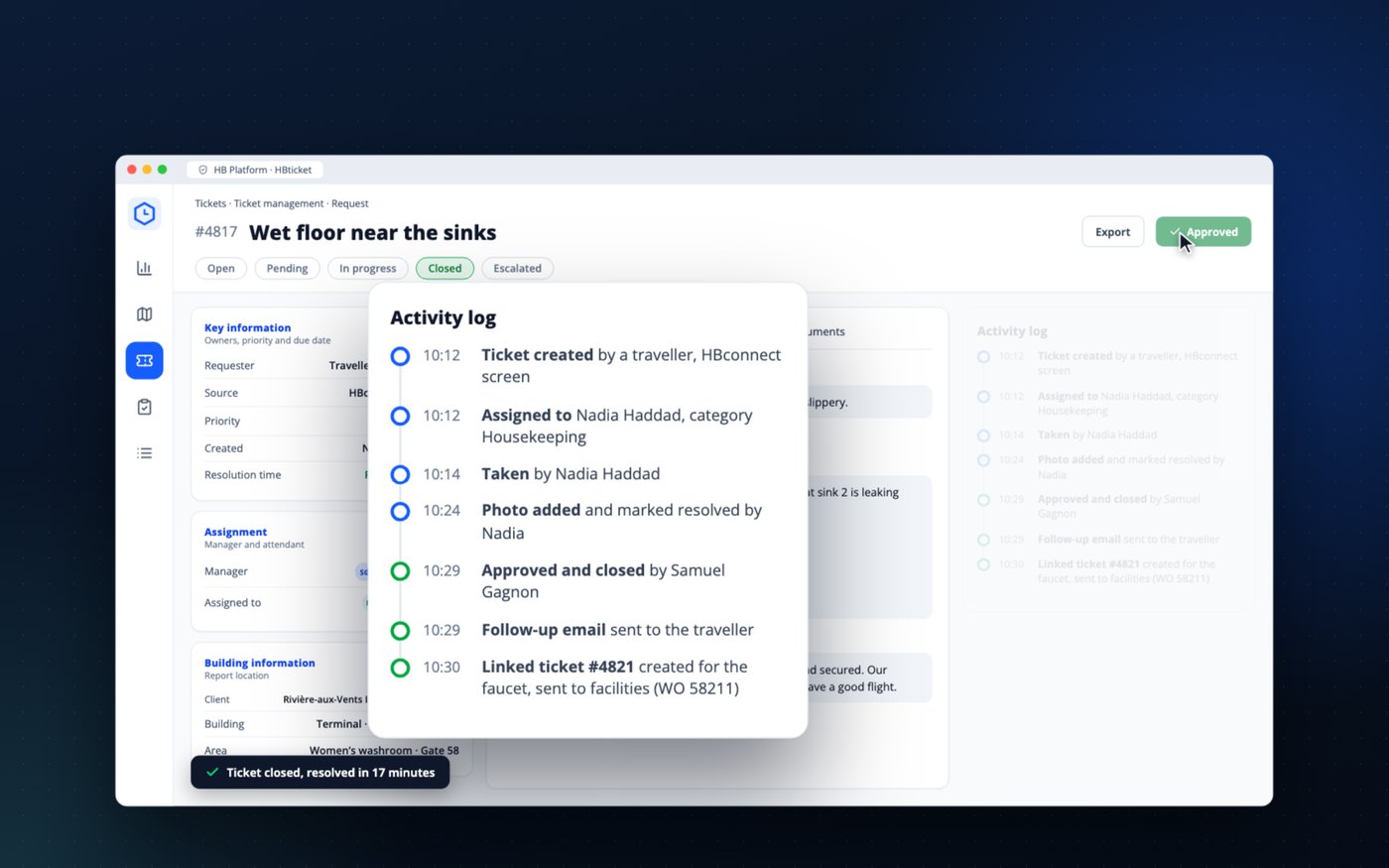
Nadia takes ownership of the ticket, dries the floor and puts up the “wet floor” sign. She attaches a photo and notes that the tap at sink 2 is leaking.
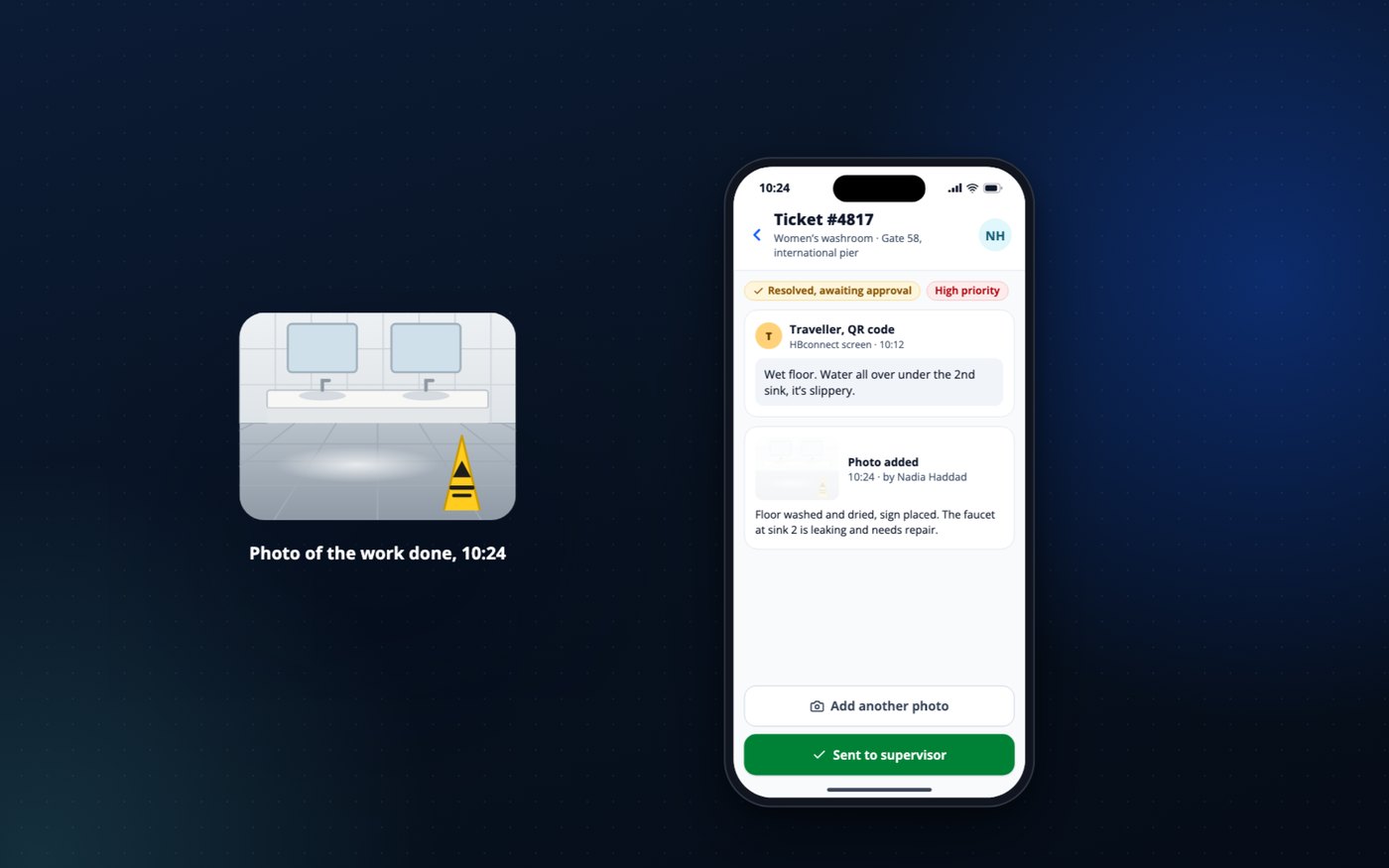
Samuel sees the photo and closes the ticket, 17 minutes after the report. The traveller receives a follow-up email before she even boards. Samuel also creates a ticket for the tap, for the terminal’s technician.
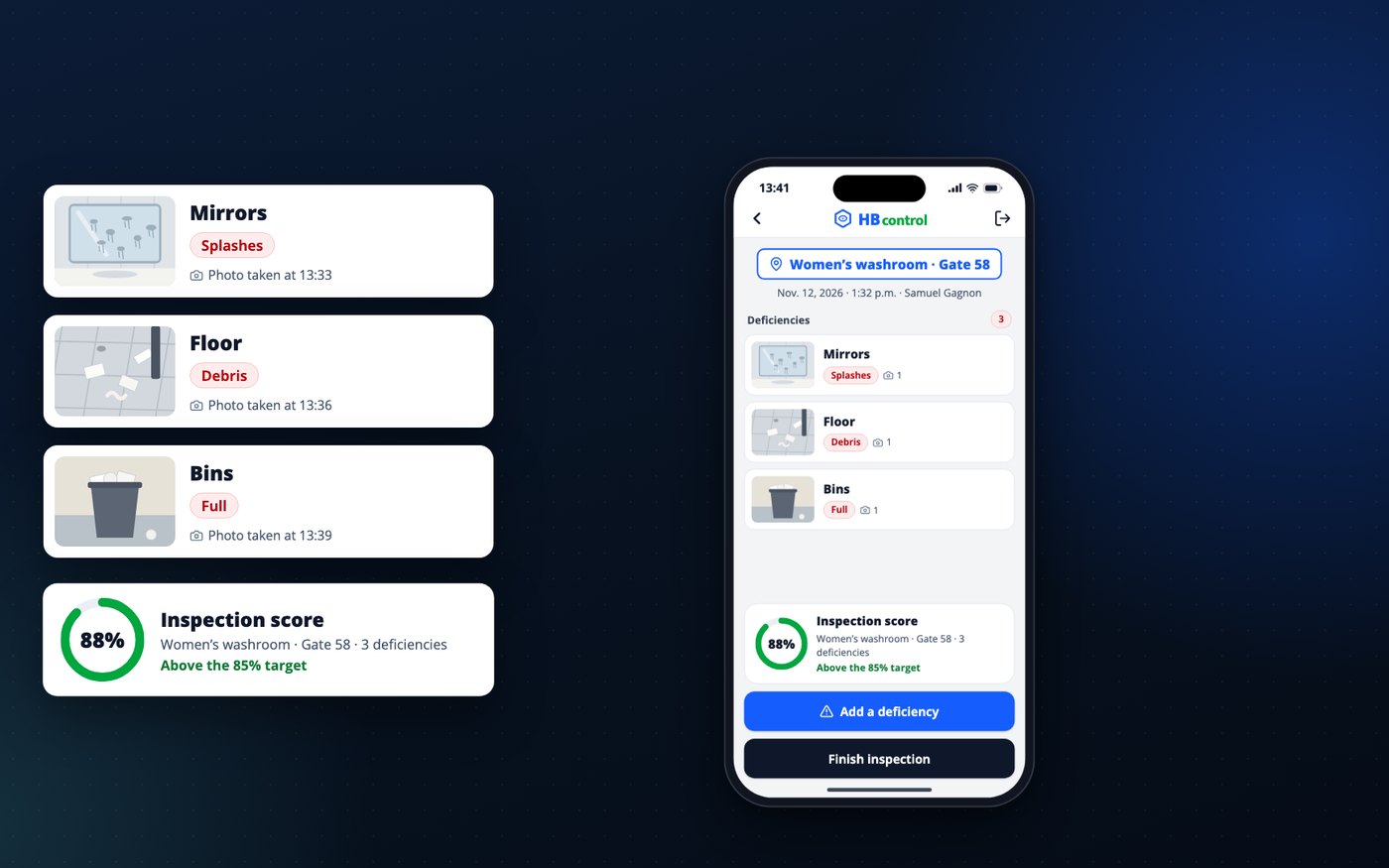
At the gate 58 washrooms, Samuel notes what is wrong: a splashed mirror, debris on the floor, a full bin. Each deficiency has its photo, and the score of 88% stays above your target.
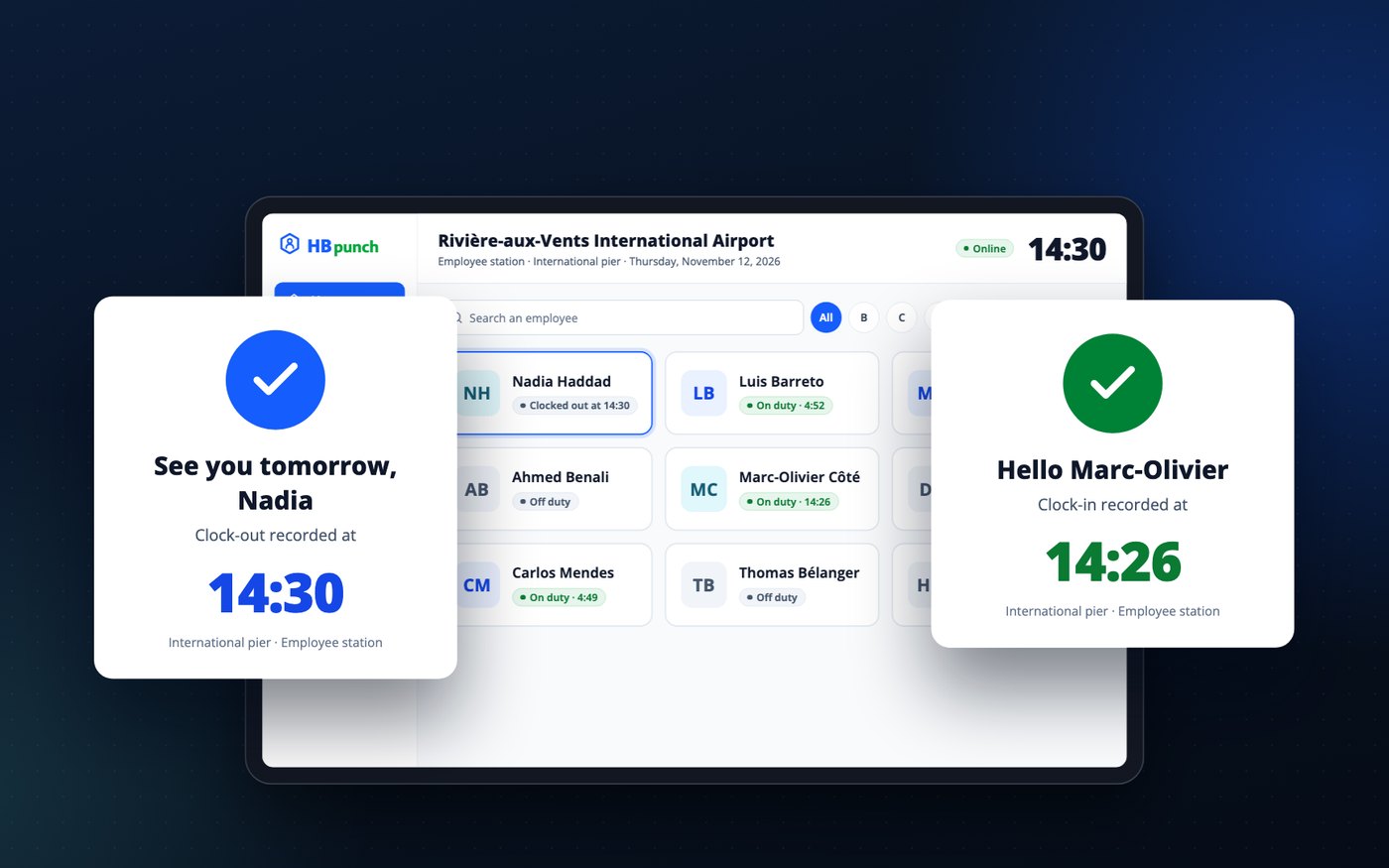
Marc-Olivier clocks in for the evening shift a few minutes before Nadia clocks out: the pier stays covered while the end-of-day flights check in.
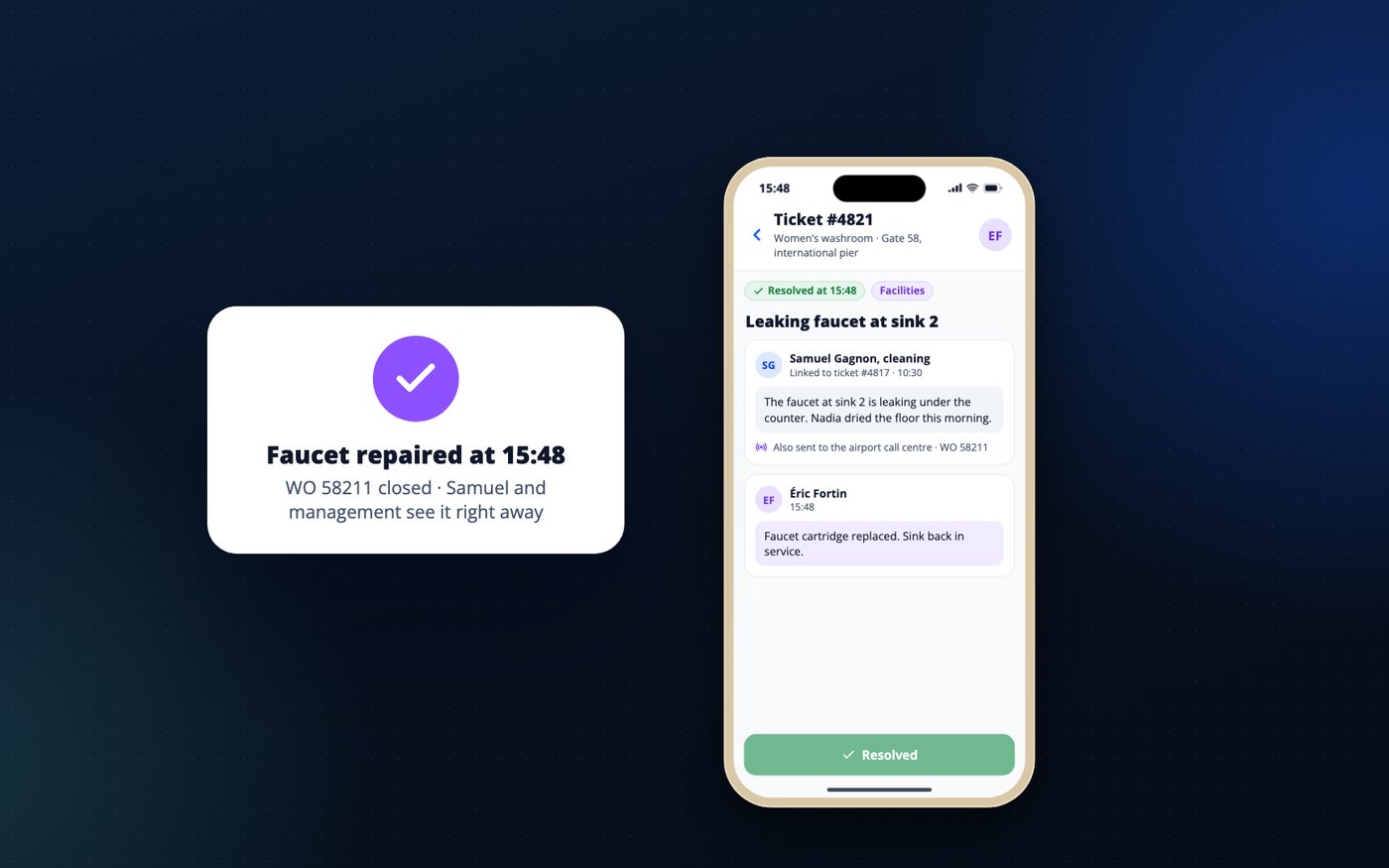
If the airport wishes, Éric receives the request in the same app and closes the ticket once the repair is done. Otherwise, Samuel passes it on through the channel agreed with the airport, the call centre for example, and the ticket keeps the work order number: technicians do not have two systems to close.
Catherine opens the terminal dashboard: blocks done, tickets resolved and average response time, quality score, dispensers below threshold, foot traffic and visits per block. She does not wait for the month-end report.
The evening route is complete: the pier’s eleven blocks were done while the last flights departed. The night shift carries on with floors and periodic tasks, when the terminal is quiet. Every visit, every count and every level is logged and will feed the monthly report.
Send us the list of your washroom blocks or the plan of one pier, and we will prepare the demo with your own areas.
The HB platform tools
What an employee does in one app shows up right away in the others and in the management portal. The sensors feed the same view.
Employee clock-in
For attendants and their supervisors
Routes and tasks, area by area
For attendants, supervisors and management
Washroom screens
For travellers, airport staff and the cleaning team
Requests and their follow-up
For management, staff, facilities and the cleaning team
Quality inspections
For cleaning supervisors and, if you wish, your own auditors
The portal for management and supervisors
For terminal operations management and cleaning supervisors
A sensor on its own tells you that a block is busy or that a dispenser is running low. In the HB platform, that alert becomes a task assigned to the nearest attendant, a visit logged on the map with its time, and a line in your monthly report. The sensors and the team’s work are in one place, and you do not have two systems to reconcile.
Entries counted at the door of each block
For supervisors and management
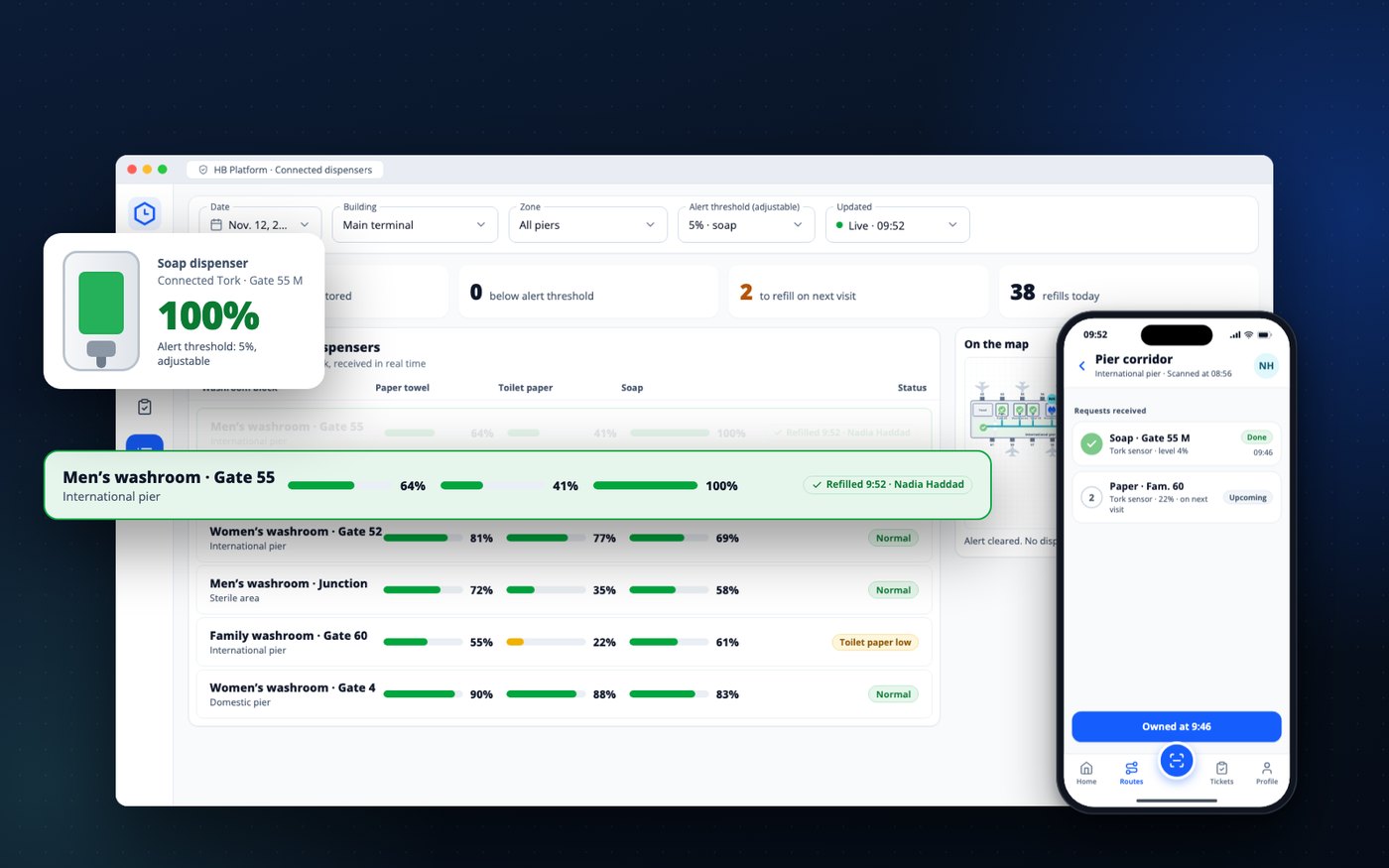
Soap and paper levels, continuously
For attendants, supervisors and purchasing
Send us the list of your washroom blocks or the plan of one pier, and we will prepare the demo with your own areas.
The benefits for your terminal
In a terminal, the washrooms are the place almost every traveller visits, and foot traffic there changes from hour to hour. Here is what is different in your building, then what each person gains.
An aircraft with 280 passengers fills a washroom block in minutes. A fixed route goes through at 7 a.m. a block that will fill up at 8:05 a.m.; counting at the door lets you send someone when it is full.
Washroom cleanliness is one of the questions travellers are asked in airport satisfaction surveys such as ASQ. An empty dispenser or a wet floor gets noticed right away, and it is often the traveller’s only contact with your cleaning team.
First departure before 6 a.m., last flight after 11 p.m., day, evening and night shifts, and a team often under contract: you need to know what was done without being on site.
Everything below is measured by the platform, not estimated. You choose which ones go into your service level agreement, your joint audits and your report, and you have what you need to explain the “washroom cleanliness” score in your ASQ survey.
| What is measured | What it replaces |
|---|---|
| Areas done out of areas planned, by route and by shift | the signed route sheet |
| Time of the last visit in each block | the radio call or the on-site check |
| Time spent per block, compared with the planned time | the contractor’s estimate |
| Time to take ownership of and close each request, with the photo of the work | the emails to dig up |
| Inspection score per block and per pier, tracked month to month | the paper inspection round |
| Entries counted at the door of each block, by period | guesswork about peak hours |
| Dispenser levels and number of refills | the checking rounds |
Send us the list of your washroom blocks or the plan of one pier, and we will prepare the demo with your own areas.
Getting started
ValkarTech handles the rollout with your cleaning team, in-house or contracted. You have nothing to install on your servers.
We walk the piers and levels with you and list the areas on your routes, washroom blocks, gate areas, corridors, hall, lounges and food courts, with their size and their use.
We prepare the day, evening and night routes and the planned time for each area, based on your flight schedules, your seasons and the frequencies in your service level agreement.
We place a tag at the entrance of each area and an HBconnect screen at the washroom blocks you choose.
We install entry counters at the selected entrances and connect the data from your connected Tork dispensers to the platform.
Attendants, supervisors and your facilities team learn to use the app. It is available in English, French and Spanish.
You receive your portal access, then your first report at the end of the first month.
There is no need to cover the whole terminal from day one. One pier is enough to start: its washroom blocks and gate areas, an HBconnect screen at the entrance of each, an entry counter at the busiest washrooms, and the day and evening routes. You compare what the platform shows you with what you knew, then decide for the rest of the terminal. The tags, screens and counts from the first pier stay in place for the next stage.
No construction work in the terminal: the tags stick on, the HBconnect screens and the counters run on batteries, with no outlet or wiring, and nothing is connected to your network. Every device placed in the sterile area is declared to your security department and your IT team before installation. Tork dispensers, sensors and gateways are purchased from Tork or your usual supplier, and can be added after the start.
Send us the list of your washroom blocks or the plan of one pier, and we will prepare the demo with your own areas.
Frequently asked questions
No. It is an entry counter placed at the entrance of the block. It captures no image or sound and recognizes no one: only the number of entries per period is transmitted.
Connected Tork dispensers, for paper towel, toilet paper and soap. Their level reaches the platform continuously, alongside the team’s visits, and the alert threshold is set per product (5% in the video). The hardware is purchased from Tork or your supplier.
Yes. The five tools and the foot-traffic sensor work without connected dispensers. You can add them later, block by block, starting with the busiest washrooms, when you renew your dispensers or your hygiene contract.
No. HBscan does not use GPS. Only the visit to an area is recorded, when the employee scans the tag at the entrance.
HBscan keeps the scans on the phone and sends them as soon as the network comes back. The recorded time is the time of the visit.
The tags are passive and stick to the entrance of each area. HBconnect screens and entry counters run on batteries, with no camera, no microphone and no connection to your networks. We provide the documentation for each device to your security department, and our installers follow your restricted area access process.
Your terminal’s data belongs to you. The platform is hosted in the cloud, and each user sees only the buildings and functions assigned to them: your contractor sees its routes, you see everything. We provide the hosting documentation to your IT department and answer its security questionnaire.
No. The HBconnect screen runs on batteries. The employee’s phone updates it over Bluetooth during the visit, with no outlet or network at the wall.
No. Your contractor’s team uses the apps, and you keep your own portal access: map, dashboard, tickets and reports for your terminal.
Yes. They receive building-related requests in the same app, and management sees their follow-up.
No, not to start. The foot-traffic sensor reacts to entries actually counted at the washroom door, not to the theoretical flight schedule. For building-related requests, your technicians do not have to use two systems: if your maintenance team wishes, it receives work orders in the app; otherwise, the supervisor passes the request on through your usual channel, call centre or CMMS, and the ticket keeps the work order number. Your reports export to Excel, CSV and PDF, and a deeper integration is assessed with your IT department.
No. HBpunch records the arrival at the staff station, the route starts at the first scan in the sterile area, and the time between the two is visible to the supervisor.
To a bilingual web form, with no account or app. It asks for no personal information; the email is optional, for follow-up.
Yes. We provide the clauses to insert in the specifications: a scan at the entrance of each area, proven frequencies, photos of deficiencies, airport access to the portal. The successful contractor uses the platform and the airport keeps its access and its history from one contract to the next.
The public hall and the entrances get snow and salt. Day routes add floor visits there, and “wet floor” reports are tracked there as they are in the piers.
The app works on a phone provided by the contractor or by the airport, or on the employee’s own phone if your contract allows it. Scanning a tag takes a single motion: holding the phone to the tag at the entrance of the area.
If the phone stops moving for the set period, it rings for 30 seconds. If the employee answers, no one is notified. Otherwise, the designated contact receives an alert with the last scanned area. The employee also has an SOS button.
The apps are available in English, French and Spanish. The washroom screens and the report form are bilingual.
Yes. Management has its own portal access, and reports export to Excel, CSV or PDF.
The price depends on the number of piers, blocks, screens and sensors. We prepare a proposal after visiting your terminal.
Send us the list of your washroom blocks or the plan of one pier, and we will prepare the demo with your own areas.
Contact us
We prepare the demo with your own areas. Send us the plan of one pier or simply the list of your washroom blocks, and you will see the route, the map and the dashboard with your gates rather than those of Rivière-aux-Vents.
Abderrazak Mokraoui, Software Innovation and Business Strategy Lead
Copy the link or have the code scanned with a phone. The video and all the tabs open in the same place.
Scan this code to open the page on a phone.